
- In Tools → Document templates, Dashboard shows recent documents and counts of issued documents, templates and drafts. Open Contracts for employment and collaboration templates, services, commercial contracts and day-worker agreements. Other forms are in Document models. Search by name or code and open the card to check the form without creating a document. Preview shows the template, category, family and format. Once you choose a suitable template, use Complete to fill it in. In Filters, combine Category, Family, Format and Visual reference and change sorting; Apply filters displays the selection. From Actions, Pin to top keeps important templates at the start. Select cards to pin, highlight, copy or export them together.
- For a sale to an individual buying outside their professional activity, choose the appropriate consumer template: in-store, second-hand goods in-store, distance or off-premises. Enter the goods, total price and complaint contacts. Check the official legal guarantee notice included in the PDF; distance and off-premises documents also include a withdrawal form, completed only if the person withdraws. For second-hand goods, a shorter liability period requires express agreement and cannot be less than one year. Before an online sale, check disclosures and the withdrawal function in your online store; generating the contract does not replace them.
- For real estate, choose the template by situation: existing property, agricultural land outside built-up areas, future dwelling or reservation. Present the draft sale agreement and draft promise for a future dwelling to a notary; generating or signing them in Fluxe does not replace notarisation. Check documents, land register, consents and tax evidence for seller and buyer. For a future dwelling, check promise formalities and the project's separate account. A reservation may last no more than 60 days, and the amount cannot exceed 5% of the price. For agricultural land outside built-up areas, follow the statutory pre-emption procedure and obtain required approvals before sale.
- For a vehicle, choose sale between professionals, purchase from an individual or in-store consumer sale, according to the company's role. Enter the VIN, documents, condition and price, and check both parties' tax evidence. Provide a valid RAR Auto-Pass or the RAR document confirming lack of information when the vehicle falls within the statutory scope. Fluxe civil contracts are not the official ITL-054 tax form and do not replace its authority sections. Record payment and handover only after they occur; complete tax declaration and ownership registration separately. For a registered vehicle, the deadline for requesting ownership registration is 90 days from acquisition; for successive transfers it runs from the first transfer.
- For a franchise, check the disclosure document and pilot-unit evidence before signing. For agency, complete commission, notice and termination terms without removing the agent's statutory rights. For agricultural lease, check property insurance and contract registration with each competent local council; track the deadline for refusing renewal. Do not confuse brokerage with commission agency: a broker's fee requires conclusion of the contract as a result of their activity, while commission agency also depends on expressly agreed terms. For consignment, complete goods insurance and separately authorise any sale on credit.
- For copyright, describe the work and separately specify Assignment type, assigned rights and uses for each right, Assignment duration and Assignment territorial scope. The work's production start and end dates do not determine how long it can be used. For a commissioned work yet to be created, complete Work delivery deadline and Work acceptance deadline. Check these terms and remuneration before signing; exclusivity must be expressly agreed.
- For a software licence, specify the program, authorised users and devices, duration and usage terms. For software or website development, establish deliverables and delivery and acceptance deadlines, then complete the separate assigned or licensed rights section: each right, uses, duration, territory and remuneration. List third-party components and their licence costs. Code delivery, administrator access and payment alone do not establish the assignment's scope.
- For photography and video, identify photographs and film separately, then complete sections on authors, producer, music and granted rights. Check the regime for commissioned photographs and any differently agreed terms. For design or translations, identify deliverables, uses and remuneration; retain evidence of rights to fonts, images, source text and other third-party materials. A translation intended for legalisation of the translator's signature follows the notarial or consular procedure separately; the service contract does not replace it.
- For copyright, check the tax regime before choosing Net fee calculation. Manual completion retains the amounts you enter. Choose Flat-rate deduction, income tax only only when the 40% deduction and 10% tax apply and no social contributions are withheld from that amount: net payable = gross − 10% × (gross − 40% × gross) = gross × 94%; gross = net ÷ 0.94. For example, RON 1,000 gross results in RON 940 after this tax. For actual income, exemptions or withheld social contributions, enter net pay according to the author's situation. Choosing the form calculation does not exercise a tax option or file returns.
- For hosting or SaaS, complete lists of transferable data and assets, formats and the exit plan. For services subject to EU provider-switching rules, check notice of at most two months, transition of at most 30 calendar days with statutory exceptions, and an extraction period of at least 30 days. Keep a data copy and transfer confirmation before deletion. Check fees and any penalties: switching charges are limited to direct costs during the statutory period and removed from 12 January 2027 within the regulation's scope. Customised services and temporary evaluation versions have exceptions that must be identified before signing.
- For money lent to the company by a shareholder, choose Shareholder-to-company loan agreement: the company is the borrower and the shareholder the lender. Expressly state interest-free terms if no interest is intended; an empty rate alone does not establish an interest-free loan. Receipt and repayment between company and individual must be cashless. Before repayment to a shareholder or related party, check net assets in approved annual financial statements: repayment is prohibited below half of subscribed share capital. For a gratuitous assignment of receivables or settlement transferring real estate rights, check the required notarised form before signing; the form does not replace the notarial deed.
- Check the prefilled company details and enter the information you know. Fields are optional: blank fields remain free for handwritten completion. For an offer, item value = quantity × unit price; if the quantity or price is missing, the total stays blank.
- Choose whether the document includes the company logo, header, page numbering and footer. Options are selected separately, also allowing documents on preprinted letterhead. At the form's end, open Edit document text to adapt titles, clauses, labels or table text. Check clause meaning and retain all mandatory information before signing. Preview and the saved draft retain customisation. Check every A4 page, header, signatures and document orientation in Preview before downloading or printing. While completing, use + and − to read details, the percentage to fit the page again and arrows to move between pages. On a phone, these controls are in Preview and options; zoom changes only display, not the saved document.
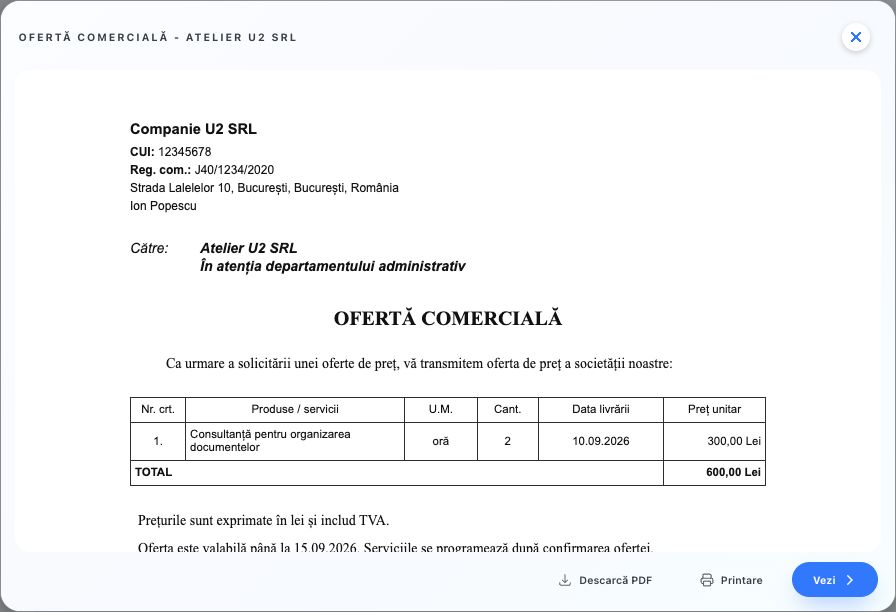
- Keep the document as a draft while details still need completing. The Draft page contains documents in preparation; Continue editing returns to completion. Issued documents retains finalised documents. Search by title and use Preview to check recipient, line items and total without downloading. For example, keep the offer for Atelier U2 SRL in Draft until you verify services and prices, then issue it.
- To provide temporary document access without a Fluxe account, choose QR code next to Share or Sharing. Choose a validity of 1 hour, 24 hours or 7 days, then Generate QR. Fluxe automatically generates a 4-digit PIN and shows it only at that moment; copy it separately before closing the window. Save the QR or copy the link and send the PIN through a separate channel. A new QR cancels the previous one. Reopen QR code and use Revoke QR access when access is no longer needed. After 10 incorrect PINs, the link is blocked. Changing or deleting the document invalidates the link; revocation does not delete copies already downloaded by the recipient.
- The recipient opens the link and enters the PIN to check the document directly on the page without downloading. They can zoom in, reset the view and go to the next page; on mobile they can zoom and pan with two fingers. Download document saves a copy. After 15 minutes, PIN access must be confirmed again; the link must still be valid. If the format does not support preview, the document remains available to download.
- Handwrite all necessary details before signing or use. Employment contracts, corporate documents and tax documents also require specific checks, approvals or registrations. Day-worker agreements are in the Day-worker agreements category in Contracts. These agreements are not individual employment contracts and do not replace statutory day-worker records, completed separately in the official electronic register. Preparing the template does not register the company, report to REGES or file returns. Issuance does not automatically send the document to the recipient.
Prepare goods transport and logistics
If you only organise transport in your own name on the customer's behalf, use Freight forwarding contract and specify instructions, carriers, insurance and settlement. If you undertake transport performance, check carrier obligations too. For fulfilment, identify storage, order preparation, transport, cash on delivery and returns separately; the merchant's obligations to the buyer do not transfer automatically to the logistics operator.
For processing supplied materials, enter received materials, consumption, product, remnants, price and acceptance. For vehicle or equipment hire, record condition, accessories, repairs, usage terms and return. For hire of a vehicle without a driver subject to Government Ordinance 27/2011, prepare Draft vehicle hire contract for road transport and present it to a notary; signing the form does not replace notarisation.
- Choose National road freight contract or International road freight contract according to the actual route. For another transport mode, use Goods transport contract and check its special regime. Enter goods, gross weight, parcels, packaging, locations, dates and recipient. Identify the carrier and required documents before loading; the contract does not replace the consignment note.
- Enter the charge, payer, any cash on delivery and insurance. Check declared value and special interest in delivery separately when agreed: the insured amount alone does not determine compensation. For national road transport, the usual statutory limit is the RON equivalent of USD 2.5 × kilograms of missing gross weight; for international transport subject to the 1978 CMR Protocol, it is 8.33 SDR (special drawing rights) × kilograms of missing gross weight. Check statutory exceptions and conditions before calculating compensation.
- Check goods condition and record reservations at collection and delivery. Under CMR, apparent damage is reported at delivery; for non-apparent damage, send written reservations within seven days excluding Sundays and public holidays. For delay, send written reservations within 21 days from the goods being made available to the recipient. Retain photographs and documents; reservation deadlines differ from limitation periods for claims.
Prepare services and works
- Choose Service agreement, Consultancy agreement or Maintenance and servicing agreement according to the actual activity. For works execution, use Works contract; for part of a main contract, Subcontract. Identify services or works, deliverables, location, materials and each party's responsibilities.
- For works, select Price determination method: Fixed price, Estimated price or Quantity and unit-rate price. Attach the estimate and specify whether VAT is included. For estimated prices, check justification for increases and whether additional works were foreseeable at contracting; a fixed price does not increase automatically when performance costs more. Complete Price advance (%) only if agreed. Agreed advance = price forming the advance base × advance percentage ÷ 100. The contract does not confirm receipt: deduct only the advance actually received at settlement.
- Complete Service review and acceptance or Works inspection and acceptance with documents, checks, observations and rectification of nonconformities. Check deliverables after completion is notified and record reservations. Under ordinary civil law, failing to attend or communicate the result without good reason may result in acceptance without reservations; this affects reliance on apparent defects, not the warranty for hidden defects. For construction, follow special acceptance formalities. Check the Works warranty regime in technical documentation and select class CC1–CC4 or planting works when Article 531 of the Construction Code applies. Enter Works warranty period (months) with at least 12 months for CC1, 36 for CC2, 60 for CC3 and CC4, or 24 for planting. If duration is blank, the statutory minimum remains applicable; check the investment's transitional situations separately.
- Set the payment deadline and check legal receipt of the invoice. Between professionals, the deadline is at most 60 days unless a longer, non-abusive clause is agreed. Do not contractually move the invoice's issue or receipt date to postpone payment. If no late-payment rate is agreed, check applicable statutory late-payment interest; when statutory conditions are met, the creditor may also claim the RON equivalent of EUR 40 at payment date and recovery costs.
- For subcontracting, identify the client and main contract. The main contractor remains liable to the client for the subcontractor's actions. In nonpayment cases, separately check direct-action conditions and the amount the client still owes the main contractor. At termination of any service or works, record progress, delivered documents and property, amounts due and returns according to the reason for termination.
Prepare personnel and data protection contracts
- For Payroll and personnel administration service agreement, specify payroll calculations, files, returns and REGES-ONLINE service separately. Check authority, designated people and document schedule before transmission. The service of completing and transmitting REGES-ONLINE entries cannot be subcontracted. The employer registers service-provider contract details within 3 working days of conclusion and termination respectively, and remains responsible for register data. Conclude the data processing agreement and establish record handover and access withdrawal on termination.
- For External occupational prevention and protection (SSM) service agreement, check authorisation, activities undertaken and cooperation with responsible company personnel. The external service may provide general introductory training; workplace training belongs to the direct supervisor and periodic training to the workplace manager. The contract does not replace statutory internal people or services. Establish documents, visits, reports and follow-up measures without confusing SSM services with medical examinations.
- For Occupational medicine service agreement, prepare the risk assessment and risk-factor form completed and signed by the employer. The doctor determines examinations and fitness. The company retains fitness certificates; the medical file stays with the medical provider and may be transferred on request to the new occupational medicine provider. Do not enter diagnoses or investigation results unnecessary for concluding the contract. The worker may challenge fitness with the public health directorate within 7 working days of receiving the certificate.
- For External data protection officer service agreement, identify the person serving as DPO, entities served, contact, resources and direct reporting to management. Publish contact details and communicate them to the supervisory authority. Check other roles and services that may create conflicts of interest; the DPO receives no instructions about their duties and cannot be penalised for performing them. The contract does not notify the authority or transfer the company's responsibility for its own decisions to the DPO.
Prepare recruitment, training and temporary work
- For selecting a company's staff in Romania, choose Recruitment and selection service agreement. Check ANOFM accreditation when the service is employment placement and enter positions, criteria, stages and when the fee becomes due. References from previous employers may concern only activities performed and employment duration, with prior notice to the candidate. Establish recipients, legal basis and retention period; do not include medical information or personal checks without a legal basis.
- For company-paid courses, choose Professional training service agreement for a company. Identify the programme, its authorisation, theory and practice hours, schedule, assessment and document that may be issued. An unauthorised provider's own documents have no national recognition. Conclude statutory participant contracts separately and check their registration with the technical secretariat. The employment contract addendum separately establishes employer and employee rights and duties; the course invoice does not automatically become an employee debt.
- For personnel supplied by an authorised agency, choose Temporary worker supply agreement. Enter the assignment, qualification, location and schedule, equipment, salary, fee and refusal or replacement terms. Initial duration is at most 24 months, with extensions totalling at most 36 months. Employees on strike cannot be replaced. The user undertaking checks salary and contribution payment: if the agency does not pay within 15 calendar days of the due date, it pays at the employee's request and recovers amounts according to law. The temporary worker's contract is concluded separately with the agency.
- For a Romanian citizen domiciled in Romania to be employed by a foreign employer, choose Overseas employment placement agreement. Check the provider's registration or notification with ITM and enter all firm-offer terms: employer, position, gross and net salary, working and rest time, leave, insurance, accommodation, food, transport, repatriation and complaint contacts. Placement is free for the candidate. Any recovery of expenses for failure to meet obligations is checked separately with supporting documents and statutory limits; it is not an automatic fee.
- Before signing, allow the candidate at least 5 days to study and have the offer explained for first-time placement, and at least 2 days if previously placed. For example, for Ion Popescu's first placement, retain the offer receipt date and evidence of explanation before scheduling signing. The employment contract or equivalent document must be provided in Romanian and the employer's state language before departure. For seasonal work, check accommodation evidence, return travel settlement, food and insurance: rent charged for compliant employer-organised accommodation cannot exceed 25% of net remuneration. Maximum rent = net remuneration × 25 ÷ 100, in the same currency and period. Generating the contract does not send ITM notifications or prove employment formalities are fulfilled.
Prepare the individual contract for an authorised course
- For the provider–participant contract, search Individual professional training contract and choose the suitable version: at the provider's premises, employer-funded, distance consumer contract or off-premises. Choose according to who pays and how the contract is concluded. An online course may have an on-premises contract, while a classroom course may be contracted at a distance. The company contract and employment addendum have separate roles.
- Enter authorisation for the actual programme, provider registration, occupation or qualification, admission conditions, competencies, theory and practice hours and schedule. Identify total price, included costs, instalments and due dates. For employer-organised and funded training, identify the company and funding document: the participant contract does not automatically transfer course payment to them. The provider presents the contract to the technical secretariat for registration; generating it does not perform that formality or issue a certificate.
- Check attendance before the examination. More than 10% unjustified absence or 25% justified absence from total duration leads to loss of eligibility for the graduation examination. Absence percentage = absent hours in the checked category ÷ total programme hours × 100. For example, 17 unjustified absent hours out of 160 is 10.625% and exceeds the threshold. Retain attendance records and justifications; paying for the course does not replace attendance or passing.
- For a consumer contracting at a distance, withdrawal is ordinarily available for 14 days from conclusion. For off-premises contracts, check whether an unsolicited home visit or organised excursion falls within the 30-day cases. Complete withdrawal recipient, address and email and provide information and form on the legally required medium. The annex form is completed and sent only if the participant withdraws; signing the contract is not withdrawal.
- To begin the course during the withdrawal period, separately record the express request and legally required acknowledgements. Course date and contract signature do not replace them. On withdrawal, proportional payment is checked only for services performed and only under statutory conditions; without the express request or required information, those costs cannot be charged. Full performance does not extinguish the right in statutory protected cases of unsolicited home visits or organised excursions. For contracting through an online interface, check the provider's withdrawal function too.
Prepare premises rental and the director's mandate
- For premises rented out by the company, choose Commercial premises lease. When the company rents from an individual tax-resident in Romania, choose Premises lease from an individual landlord. For premises already rented, use Commercial premises sublease and check the main contract for prohibition or consent conditions; do not promise wider use than the right received.
- Check title, land register, area, intended use and people whose consent is required. In the company lease template, complete Start of premises use separately from signing date, Deposit terms and balance return, and Premises handover and return. Record condition, keys and meter readings at actual handover. The deposit is not automatically deducted from the last rent. Lease duration is at most 49 years. For urgent repairs restricting use for more than 10 days, check proportional rent reduction and record time and the unused part of the premises.
- When paying rent from personal property to a resident individual, the company checks gross income, including expenses legally owed by the owner but paid by the tenant. Net taxable income = gross income × 80%. Withheld tax = net taxable income × 10%. For rent denominated in foreign currency but paid in RON, use the BNR rate from the day before payment. Payment exclusively in kind and a deposit applied to rent have a separate regime: the owner calculates and declares tax, while the company declares income according to law. Check CASS separately. The owner registers the contract and changes with the tax authority within 30 days; for joint ownership, designate in the contract who fulfils the obligation.
- For a director, choose SRL director mandate agreement — individual or SA director mandate agreement — one-tier system according to the company's form and organisation. Identify the appointment resolution, powers, duration, gross remuneration and authorised company signatory. The director expressly accepts the mandate and declares compliance with statutory eligibility requirements. If also signing for the company, check authorisation and self-contracting rules before signing.
- For an SA in a one-tier system, the mandate is at most 4 years, or 2 years for initial board members; check professional liability insurance and suspension of any prior employment contract with the company. SA administration rules do not automatically apply to an SRL. At termination, record handed-over documents, registers, property and access and complete registration formalities. Generating the contract does not appoint the director or perform tax or trade register registration.
Prepare gratuitous loans for use, mandates and joint ventures
- For free use, choose the vehicle, premises or movable-property loan-for-use agreement. Identify the property, lender's right to grant use, purpose, condition at handover and return deadline. Check agreement before allowing use by someone else. For registered offices, complete registration and address-change formalities separately; ending the loan for use does not automatically deregister the company.
- Establish who bears expenses and how necessary and urgent works are notified. Check early-return situations and liability if you change the purpose or retain property past the deadline. For vehicle or premises loans for use, enter the agreed penalty in RON per day. Late penalty = agreed RON per day × days of attributable delay, under the clause and law. A blank amount does not establish a contractual penalty. The generated PDF alone does not confer a legally certain date or notarised form.
- For a mandate, describe acts the other party may conclude in the company's name and on its behalf and the authority's value limits. Authority for disposal acts must be express; obtain a notarised power of attorney separately when required by law. Check duration, remuneration, expenses and revocation or resignation terms. For simply bringing parties together, use Brokerage agreement; for an agent's activity, use Agency agreement.
- For a contractual joint venture, identify operations, contributions, property and the party keeping records. Complete shares so the total is 100%. Joint operation result = related income − related expenses, in RON; participant's share = result × participation percentage ÷ 100. The result may be profit or loss. Do not set a guaranteed minimum benefit. Check third-party contracts separately: internal shares do not limit liability to third parties. Complete notice and establish inventory, settlement and returns on termination.
Keep a template and copy an issued document
Saving a template or opening a copy does not issue the document or send it to the recipient. Old details, including number and date, are transferred for review; change them when the new transaction requires different values.
- Complete the form and adapt text and presentation options. In administrative forms, choose Save as template below preview, enter Template name and press Save. Delete clears the name and closes the window. In other forms, open Save as template, enter an easily recognised Template name, for example U2 consultancy contract, then choose Save template.
- Next time, open Document templates → My templates and choose Use template. Find the same template by name in global search under Templates. Rename changes only the template's name.
- To start from a finalised document, open Issued documents and choose Actions → Copy, or open preview and choose Copy. The editor transfers details into a new document; the original is retained.
- Check number, date, recipients, line items and clauses for the new use. Save document retains the new draft; issue only after review. If you adapted a template and want to keep it for future use, save it again under its own name.
Check template calculations
In Expense claim, Amount in RON = Foreign currency amount × Entered exchange rate, rounded to two decimal places. Claim total = sum of line-item RON amounts. Enter each expense's amount and rate: a missing value is not treated as zero in the template total.
In Stock card, enter Opening stock, then record movements in order. New stock = Previous stock + Receipts − Issues. In Material consumption limit sheet, enter Approved limit; Net consumption = max(Issued − Returned, 0), and Remaining limit = Previous limit − Net consumption. Quantities display three decimal places. If returns exceed issues, check the documents: displayed net consumption is zero.
In Inventory results report, Difference = Physical quantity − Book quantity. Surplus = max(Difference, 0); Shortage = max(−Difference, 0); Difference value = Difference × Unit price. Enter both quantities and price before checking the amount. For example, 12 physical units against 10 book units at RON 25/unit means a surplus of 2 units and value difference of RON 50.
In Timesheet, Hours worked = max(Duration between start and end times in minutes − Break in minutes, 0) ÷ 60, rounded to two decimal places. Enter the break in minutes; a missing time leaves the result blank. End time must follow start time on the same day; check the split of an overnight shift separately.
In Vehicle trip sheet, Distance travelled = Arrival odometer − Departure odometer, displayed with one decimal place. Enter both readings and compare with the actual journey. Arrival odometer must be at least equal to departure; the form requires correction of a lower value before saving.
Related resources
Practical example
Pregătești o ofertă pentru Atelier U2 SRL: 2 ore × 300 lei/oră = 600 lei. Alegi oferta din Instrumente → Documente tipizate → Modele documente, verifici firma și destinatarul și completezi pozițiile. Citești fiecare pagină în Previzualizare, păstrezi ciorna dacă mai lipsesc date și finalizezi numai după verificare.
Frequently asked questions and solutions
A field remains blank in the document. Can I use the template like this?
Uncompleted fields remain blank for later completion. Check whether the omission is intentional and enter all necessary details before signing or using the document. For a quote, a missing quantity or price may leave the total blank; return to the form and check the preview.
The generated document still needs details completing. Can I send it?
Preview every page and complete the necessary details, items and attachments. Check the people and company the document concerns. Send or sign the final version only after review; choosing a form does not automatically confirm its contents are correct.