
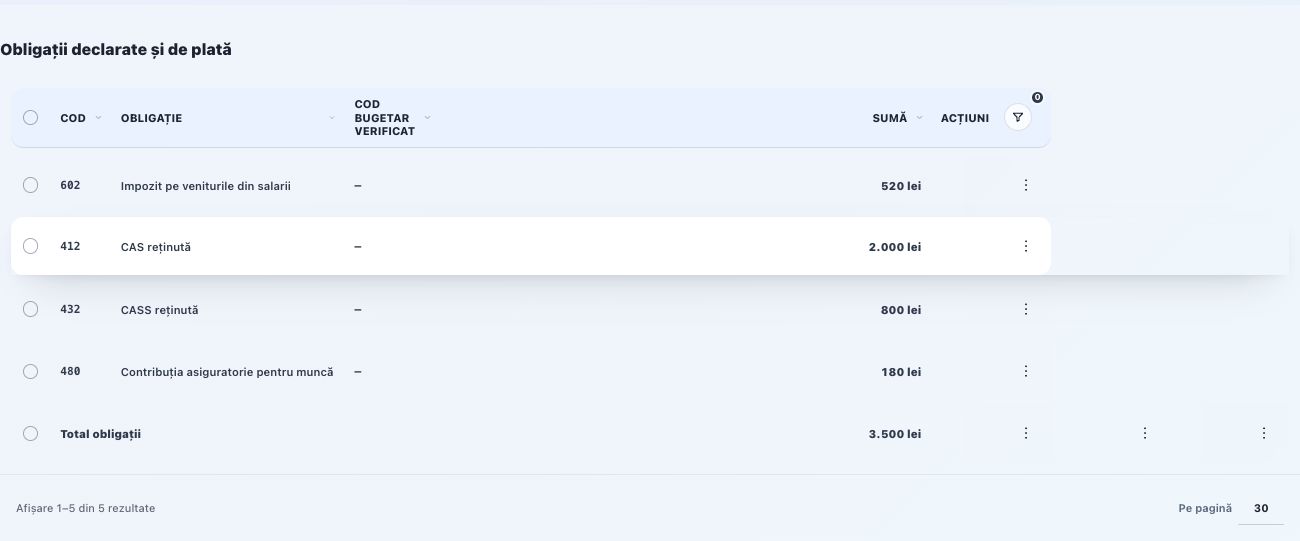
The page brings together employees, gross income, pension contributions (CAS), health contributions (CASS), income tax and the employer labour insurance contribution for each month. Totals come from the confirmed or closed payroll and are used to reconcile the official return.
Information tracked on the page
The month is essential: ANAF may update the form during the year. For July 2026 and the subsequently specified periods, use the form under joint order no. 605/95/928/2.314/2026.
Employees and the Gross, CAS, CASS, Tax and CAM totals must reconcile with payroll, the payroll summary and the same month's journal entries.
Total liabilities = CAS + CASS + income tax + CAM. Net pay = gross pay − deductions validated in payroll.
Fluxe checks data recorded in the application; Soft J checks the file against the official rules for the period.
For tax obligations whose statutory deadline is 25 December, the due date is 21 December. If 21 December is a non-working day, the last preceding working day applies. Accordingly, the deadline was 19 December in 2025 and is 21 December in 2026, under Article 155(2) of the Tax Procedure Code.
Important! Use Fluxe to check payroll data. Complete and validate the final return in the ANAF software for the reporting month. The downloaded working file is not submitted directly.
D112 covers payroll obligations and individual records of insured persons. The usual deadline is the 25th, inclusive, of the following month. Quarterly filing is permitted only for legally eligible categories: prepare a return for each month of the quarter, all due by the 25th, inclusive, of the month following the quarter.
For July–December 2026, use the D112 version indicated by ANAF for that period. Do not use the first-half form simply because it opens without an error.
Supporting documents
- Individual employment contracts and amendments, including start and end dates, role, working hours and gross salary.
- Employee identification, insurance information and documents for deductions and dependants where applicable.
- Timesheets and leave approvals; records of medical leave certificates, suspensions, absences and overtime.
- Payroll, the summary, accounting entries, payment orders and bank statements; previous D112 and its submission receipt if correcting.
Completing and checking data
- In Employees, check everyone who earned income during the month: name, CNP/NIF and other mandatory details. Do not create a second person for a contract change.
- In Employment contracts, check start date, active period, working hours and gross salary against the contract and amendments. Compare with the month’s timesheets and leave documents; timesheets are prepared from employer documents.
- In Payroll, use Choose month and calculate, then Open. Compare days, gross salary, CAS, CASS, tax, net salary and CAM with documents. Confirm only checked payroll; first identify special cases requiring treatment in ANAF software.
- In D112, Confirmations, choose the same Year and Month. Complete Main CAEN, Health insurance fund and Declarant first name/last name/role. Compare Obligations with confirmed or closed payroll and check every employee.
- Use Check and archive D112 after completing supported confirmations. Download the version from XML history for checking; complete special situations in ANAF software and validate before signing and submitting.
Individual details and obligations agree with checked payroll; the full return was validated in ANAF software, submitted and has a checked submission receipt. Keep separate evidence of salary and tax payments.
Completing and checking the form in Fluxe
- In Confirmations, choose Year and Month. Confirm that month's payroll and check company and employee identification: CNP, contract, working hours, days and calculation bases.
- Reconcile gross pay, CAS, CASS, tax and CAM with the payroll summary, payments and journal entries.
- For the minimum wage covering a full month, check the RON 300 allowance in January–June or RON 200 in July–December 2026 and the basic personal deduction with no dependants. Separate employees with sick leave, suspensions, overtime, other deductions or non-standard contracts.
- Enter the four-digit main CAEN code, Health insurance fund and declarant. For Ion Popescu, Declarant surname is Popescu and Declarant first name is Ion; the role must be the actual role of the person making the declaration.
- Under Liabilities, check the amount and Code in return for each entry. Return codes may contain the letter X according to the ANAF code list; for payment, check the Treasury account and liability details separately.
- Select the confirmations only after reviewing each employee's circumstances. Correct any flagged data or amounts before generating the file.
- Use Check and archive D112 to retain the check results in XML history. A closed payroll remains available as a source and retains its confirmed values.
Validation and filing
- Download D112 software for the month and updated Soft J and check the last update date on the ANAF page.
- Import or enter the data, run the official validation and resolve relevant errors and warnings.
- Compare the final totals in D112 with the reconciled position in Fluxe and related declarations.
- Sign with the registered qualified certificate and submit through the service specified by ANAF.
- Download the acknowledgment, check acceptance and archive the submitted file, validation report and evidence.
What to check before submission
Use the ANAF software to complete and check sick leave, suspensions, overtime, deductions for dependants, additional deductions and non-standard contracts; do not rely solely on the data prepared in Fluxe for these situations. Quarterly reporting applies only to the categories in the instructions and retains separate data for each month.
Legal basis and verification date
Joint Order No. 605/95/928/2.314/2026 for the periods specified by ANAF, the D112 instructions and Article 147 of the Tax Code.
Legislative reference: 13 October 2026. Before a later filing, check the software version, instructions and deadline applicable to the period again.
Official sources
Related resources
Practical example
Ion Popescu are un contract standard cu normă întreagă, activ pe întreaga lună, și un pontaj complet, fără situații speciale. Compari contractul, statul confirmat și datele din D112, apoi generezi fișierul de lucru și îl verifici în programul oficial al lunii. Dacă există o modificare contractuală în cursul lunii, o absență ori altă situație care nu intră în profilul standard, completezi cazul în programul oficial; nu confirmi o lună integrală pentru a permite generarea în Fluxe.
Frequently asked questions and solutions
An employee is missing or gross salary is wrong
Check start and end dates and the salary valid in the selected month, then payroll. Do not alter closed payroll to overwrite history; follow the permitted correction and prepare an amended return if the previous one was filed.
There is medical leave, suspension or special deductions
Collect the necessary certificates, documents and declarations. Calculate and complete these cases in ANAF software for the month; do not confirm an employee is a standard case if documents show otherwise.
The D112 total differs from payroll or payments
Compare each person and obligation, beyond the total. Check the month, rounding, deductions and corrections. Net employee payments are not the total tax obligations in D112.