
An active Professional or Business plan is required for this activity.
For an SRL, profit retained in the company is not personal income. The dividend comparison assumes legally distributable profit and payment in 2026. If the shareholder also receives salary or retains profit for investment, request a complete withdrawal calculation rather than relying on the generic comparison.
Enter income and compare tax regimes
- In Tools → Tax calculator → Simple calculator, enter gross income or desired net amount, period and expenses. Gross means business income excluding VAT, not salary. For monthly amounts, the calculation assumes 12 identical months and applies annual thresholds.
- After the simple calculation, choose Continue this calculation in advanced mode to transfer income and expenses as annual amounts. Check assumptions before recalculating. Choose Advanced calculator for standard-income assessment, microenterprise tax, personal exceptions, losses and dividends. Legal form alone does not prove tax-regime eligibility.
- For self-employment, enter income and deductible expenses or adjusted annual standard income. Select only exceptions with supporting documents and enter employment income or other income relevant to CASS.
- For companies, enter the tax base and distributable accounting profit separately. For microenterprises, check combined revenue with linked enterprises, staffing conditions and business sector.
- After calculation, choose Optimise based on this calculation. Complete the four stages about residency and contributions, activity, expenses and microenterprise conditions. Include personnel and accounting costs in SRL expenses; choose I do not know for unconfirmed conditions.
- In Scenarios to compare, enter a name and choose Add current calculation. Keep up to five scenarios for the current company in your session. Resume scenario opens details in advanced mode for a new calculation. Download the report with annual and monthly results, entered details, year and assumptions before signing out.
- Analyse tax options and compare annual personal net income, taxes and included costs. The result shows only scenarios calculable from your answers. Check suggestions' legal basis and confirm classification and option timing with the accountant before applying them.
Calculating the result
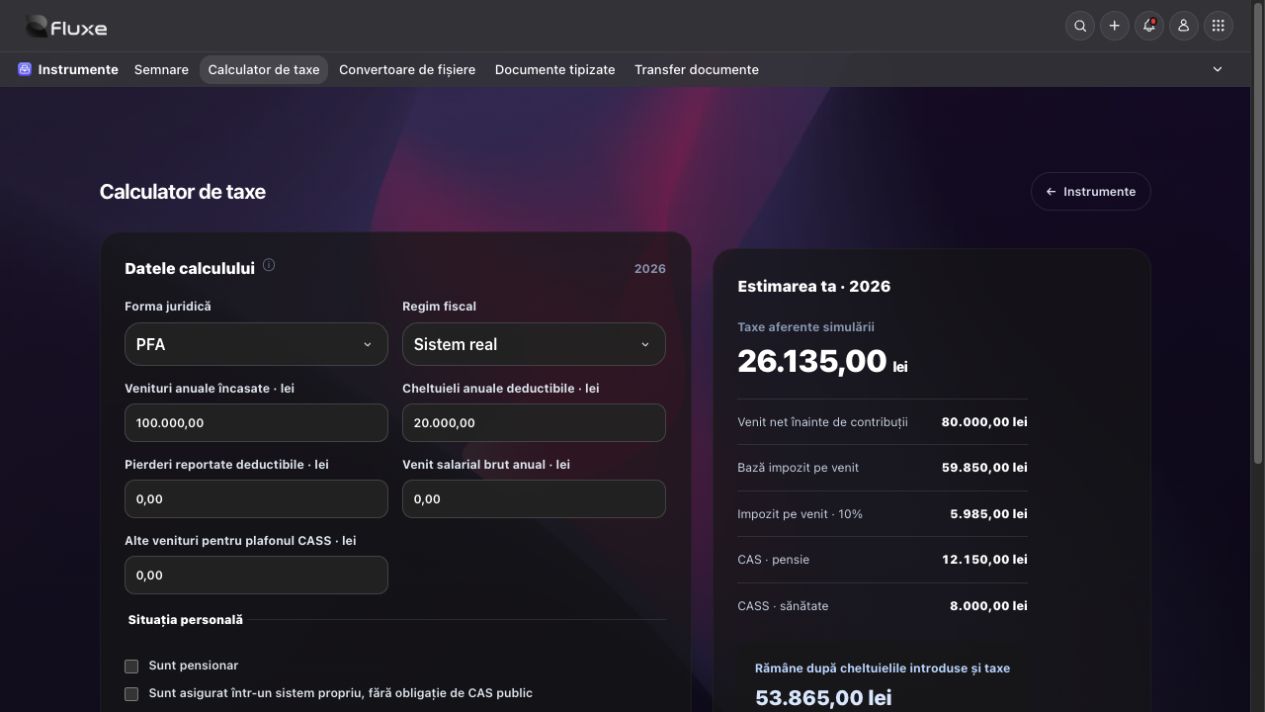
- PFA under actual income assessment: net income before contributions = receipts − deductible expenses. Income tax = 10% × the greater of 0 and net income minus deductible carried-forward losses, CAS and deductible CASS. The CASS top-up to the minimum does not reduce income tax.
- PFA personal net income = receipts − actual expenses − income tax − CAS − CASS. Under standard-income assessment, income tax is 10% of adjusted standard income; actual expenses reduce money remaining without reducing standard income.
- Corporate income tax = taxable profit × 16%. Microenterprise tax = microenterprise tax base × 1%. Tax on dividends distributed in 2026 = gross dividends × 16%. Personal net dividends = gross dividends − dividend tax − the CASS increase caused by these dividends.
Related resources
Practical example
PFA under actual income assessment: with receipts of RON 100,000 and deductible expenses of RON 20,000, without exceptions or other income, income tax is RON 5,985, CAS RON 12,150 and CASS RON 8,000. RON 53,865 remains annually.
Frequently asked questions and solutions
Microenterprise or standard-income assessment missing from comparison?
Check eligibility answers, personnel costs, linked-enterprise figures, previous-year receipts and local standard income. I do not know does not confirm tax entitlement.
Calculated net differs from desired income?
CAS and CASS can increase at thresholds. Net-to-gross calculation finds the lowest gross amount ensuring at least the requested net under the entered assumptions.
No result for a special regime, partial year or tax adjustments?
Check classification and calculate specific obligations with the accountant; do not automatically apply ordinary-regime formulas.